We have compiled a list of manufacturers, distributors, product information, reference prices, and rankings for Comparison Software.
ipros is IPROS GMS IPROS One of the largest technical database sites in Japan that collects information on.

Comparison Software Product List and Ranking from 8 Manufacturers, Suppliers and Companies | IPROS GMS

Last Updated: Aggregation Period:Jun 03, 2026~Jun 30, 2026
This ranking is based on the number of page views on our site.

Comparison Software Manufacturer, Suppliers and Company Rankings

Last Updated: Aggregation Period:Jun 03, 2026~Jun 30, 2026
This ranking is based on the number of page views on our site.

  1. ヒューリンクス Tokyo//software
  2. エーディーディー Kyoto//software
  3. B7 Tokyo//software
  4. 4 ワイ・エス・エス Kanagawa//IT/Telecommunications
  5. 5 ディスク・テック 本社 Shizuoka//Industrial Electrical Equipment

Comparison Software Product ranking

Last Updated: Aggregation Period:Jun 03, 2026~Jun 30, 2026
This ranking is based on the number of page views on our site.

  1. Revision work of quality standard documents for the manufacturing industry with 'Old and New Document Word Versions' ヒューリンクス
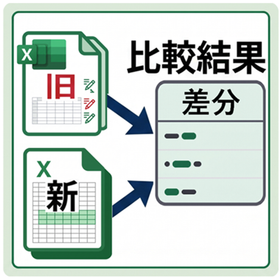
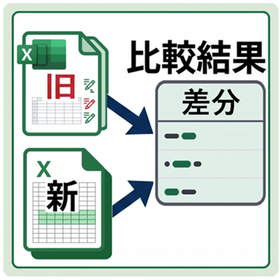
  2. Comparison of Changes in Terms and Conditions for the Insurance Industry: 'Old and New Documents Excel Version' ヒューリンクス
  3. [For the construction industry] Revision history of drawings and specifications in 'Old and New Document Word Version' ヒューリンクス
  4. 4 Comparison of Old and New Clinical Trial Data for the Pharmaceutical Industry: 'Old and New Document Excel Version' ヒューリンクス
  5. 5 File comparison software "Diff Doc" エーディーディー

Comparison Software Product List

1~30 item / All 32 items

Displayed results

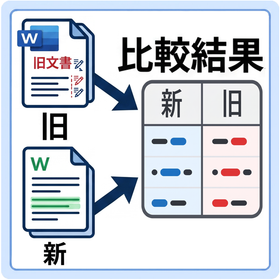
Document Comparison Software Doc Comp

Automatically compare old and new documents using software. It can perform consistency checks for revision rules and supports multilingual documents.

We will automatically perform the verification of old and new documents, which has relied on human labor until now, using software. It supports multiple languages, making it very convenient.

  • Internal Control and Operational Management
  • Other security and surveillance systems
  • others
  • Comparison Software

Added to bookmarks

Bookmarks list

Bookmark has been removed

Bookmarks list

You can't add any more bookmarks

By registering as a member, you can increase the number of bookmarks you can save and organize them with labels.

Free membership registration

File comparison software "Diff Doc"

It is an easy-to-use file comparison tool.

"DiffDoc" is software that can compare two files, such as Word files and PDF files, and detect differences.

  • others
  • Document and Data Management
  • Comparison Software

Added to bookmarks

Bookmarks list

Bookmark has been removed

Bookmarks list

You can't add any more bookmarks

By registering as a member, you can increase the number of bookmarks you can save and organize them with labels.

Free membership registration

CAD Network Conversion and Comparison Software TsNetChangeEX

If you have coordinate data, netlists, and Gerber data, it can also be converted to other CAD data.

TsNetChangeEX is software that converts and compares netlists from circuit diagram CAD and artwork CAD. This leads to a reduction in troubles and a significant improvement in work efficiency.

  • Software (middle, driver, security, etc.)
  • Comparison Software

Added to bookmarks

Bookmarks list

Bookmark has been removed

Bookmarks list

You can't add any more bookmarks

By registering as a member, you can increase the number of bookmarks you can save and organize them with labels.

Free membership registration

Multi-page file automatic drawing comparison PloCVAuto

We will accurately and efficiently mark changes made to many drawings contained in a multi-page file.

A product's drawings are typically composed of many drawings and are contained in files such as multi-page PDFs. When there is a design change, comparing all the drawings of the old and new versions and marking the changes is a labor-intensive task. PloCVAuto automatically performs the comparison of the large number of drawings contained in the two multi-page files.

  • Other CAD related software
  • Comparison Software

Added to bookmarks

Bookmarks list

Bookmark has been removed

Bookmarks list

You can't add any more bookmarks

By registering as a member, you can increase the number of bookmarks you can save and organize them with labels.

Free membership registration

Vector/Image Conv PloCompAuto

Overlap files, or find change areas and convert continuously.

PloCompAuto stacks multiple drawing files, such as those for printed boards, into one drawing and automatically converts it into files such as PDF and TIFF at high speed. It also compares the drawings of two drawing files and automatically and continuously determines the areas to be changed. PloCompAuto will be a very effective tool for electronic library, PDM system construction, or design change management.

  • Data conversion software
  • Comparison Software

Added to bookmarks

Bookmarks list

Bookmark has been removed

Bookmarks list

You can't add any more bookmarks

By registering as a member, you can increase the number of bookmarks you can save and organize them with labels.

Free membership registration

Integrated Reverse Engineering Software PointMaster

Integrated Reverse Engineering Software PointMaster Shape Comparison 3D Measurement Internal Defect Detection Thickness Measurement

By using PointMaster, you can utilize the data obtained from 3D measurements in various scenes such as shape comparison, CAD, and CAE. - Shape comparison of three-dimensional models - Detailed reporting features - Positioning function through point indication - Creation of surfaces from point clouds, polygons, and images - Handling of large volume data - Interactive and rapid operability - Interface with CAD data and CAD software

  • Contract Analysis
  • Image analysis software
  • Image Processing Software
  • Comparison Software

Added to bookmarks

Bookmarks list

Bookmark has been removed

Bookmarks list

You can't add any more bookmarks

By registering as a member, you can increase the number of bookmarks you can save and organize them with labels.

Free membership registration

CAD Network Comparison Software TsNetChangeEX (Limited Function Version)

This TsNetChangeEX (limited version with comparison function) automatically checks the consistency between networks.

Even if the circuit diagram CAD is in a state where it can output nets, it is not a problem if the net format has complete compatibility between the circuit design CAD and the board design CAD. However, if that is not the case, the issue that arises is the consistency of the nets.

  • Other embedded systems (software and hardware)
  • Comparison Software

Added to bookmarks

Bookmarks list

Bookmark has been removed

Bookmarks list

You can't add any more bookmarks

By registering as a member, you can increase the number of bookmarks you can save and organize them with labels.

Free membership registration

HPGL/Vector/Image Viewer PloComp

PloComp is HPGL/Vector/Image viewer, converter and comparator.

PloComp is viewer for viewing drawing which works on Windows PC. PloComp reads plural HPGL/Vector/Image files and PloComp piles up or arranges drawing, and displays it. And, old and new drawing comparison can be performed by recognition of different colors and change area by cloud mark. PloComp has highly efficient drawing edit function like 2D-CAD, it diverts design drawing and can create drawing of another use easily. Drawing comparison video ... https://youtu.be/AunDSJ6xVvI

  • Other CAD related software
  • Comparison Software

Added to bookmarks

Bookmarks list

Bookmark has been removed

Bookmarks list

You can't add any more bookmarks

By registering as a member, you can increase the number of bookmarks you can save and organize them with labels.

Free membership registration

Furix

BetterWMF solves problems that occur when copying and pasting! There is CompareDWG, which displays graphically.

We would like to introduce our product 'Furix'. BetterWMF solves problems that occur when copying and pasting drawings into other software packages like Microsoft Word, and CompareDWG detects differences between two revisions of AutoCAD drawings and displays them graphically. Please feel free to consult us when you need assistance. 【Product Lineup】 ■BetterWMF ■CompareDWG *For more details, please refer to the related links or feel free to contact us.

  • Company:B7
  • Price:Other
  • Other network tools
  • Comparison Software

Added to bookmarks

Bookmarks list

Bookmark has been removed

Bookmarks list

You can't add any more bookmarks

By registering as a member, you can increase the number of bookmarks you can save and organize them with labels.

Free membership registration

Tool "Kaleidoscope"

Render source code visually appealing and easy to read! Equipped with multiple built-in themes.

"Kaleidoscope" is a powerful tool for finding differences between text and image files, or folders containing files. It adds relevant context when resolving merge conflicts from Git, making it easier to understand complex merge tasks. Please feel free to contact us if you need assistance. 【Features】 ■Git Merge Context ■Git File History ■Syntax Coloring ■Comparison to Merge ■Text Filters ■Kaleidoscope Prism *For more details, please refer to the PDF document or feel free to contact us.

  • Company:B7
  • Price:Other
  • Software (middle, driver, security, etc.)
  • Comparison Software

Added to bookmarks

Bookmarks list

Bookmark has been removed

Bookmarks list

You can't add any more bookmarks

By registering as a member, you can increase the number of bookmarks you can save and organize them with labels.

Free membership registration

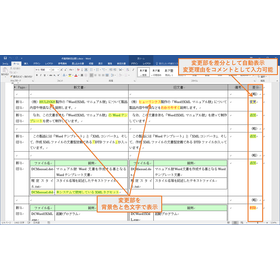
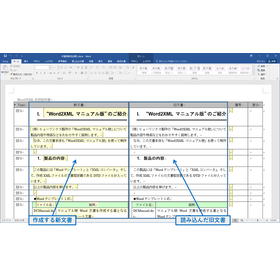
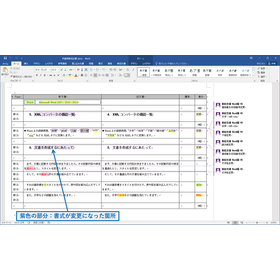
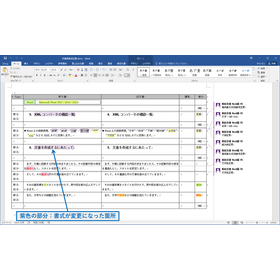
Word version of 'Old and New Documents' for manuscript revision work in the publishing industry.

A tool for generating comparison tables to streamline manuscript revisions in the publishing industry.

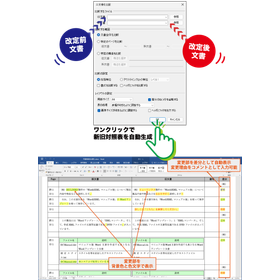
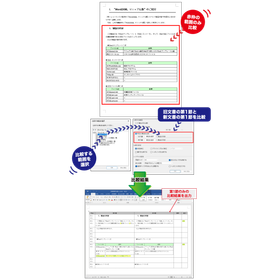
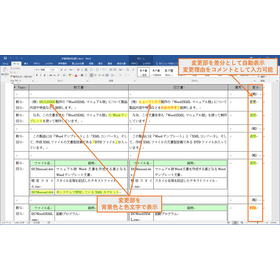
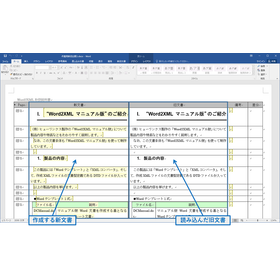
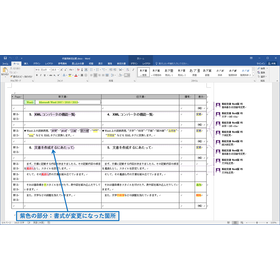
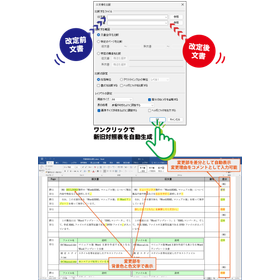
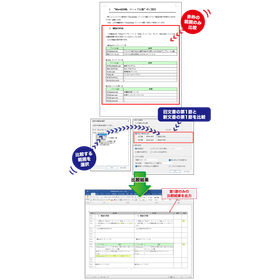
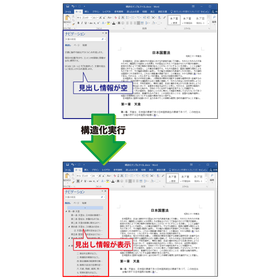
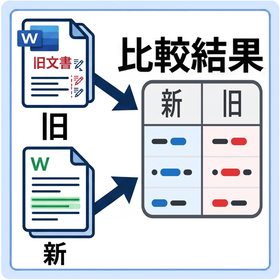
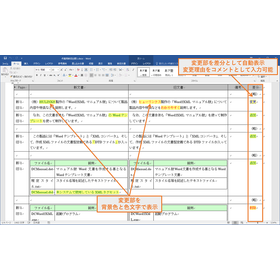
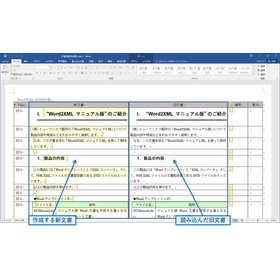
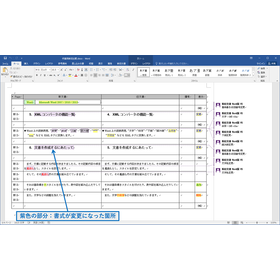
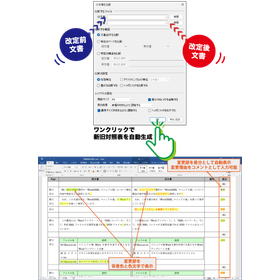
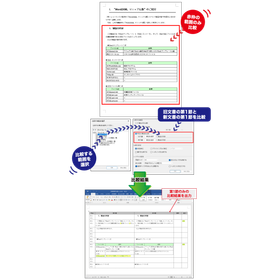
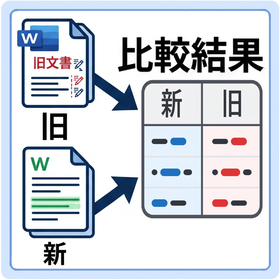
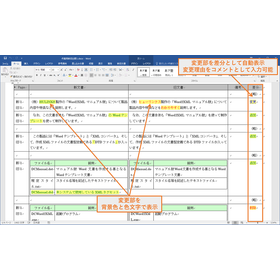
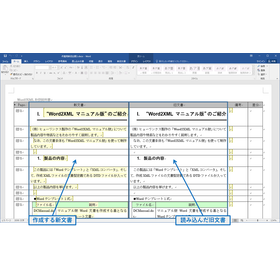
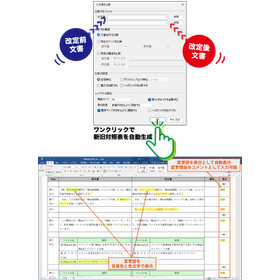
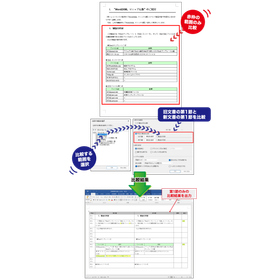
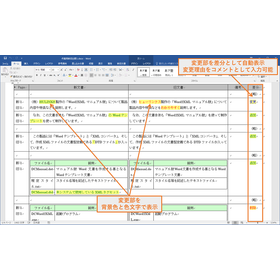
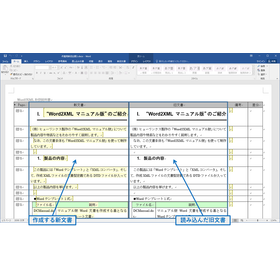
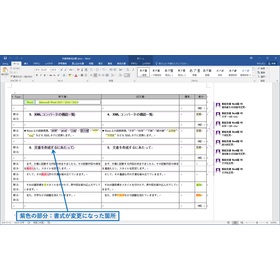
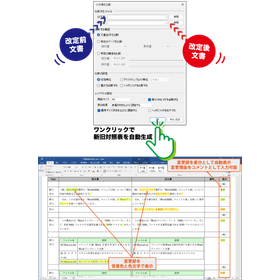
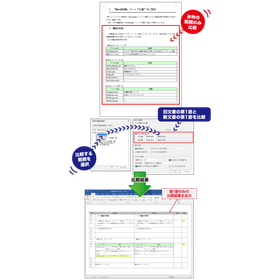
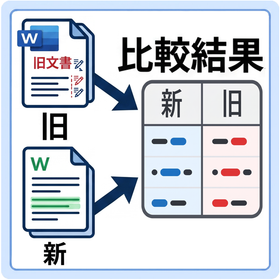
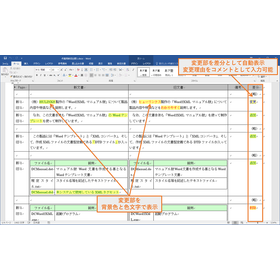
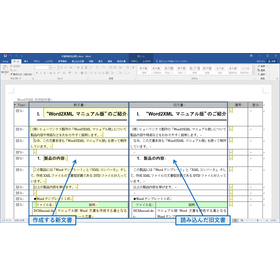
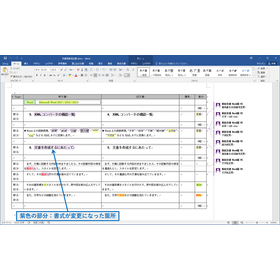
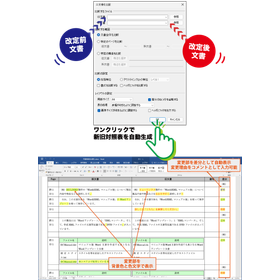
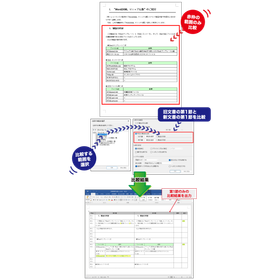
In the publishing industry, it is essential to accurately and quickly grasp the changes between the old and new versions during the manuscript revision process. Particularly in proofreading and editing tasks involving multiple people, preventing the oversight of minor corrections and the inclusion of unintended changes is crucial for maintaining quality. To address these challenges, the "Old and New Document Word Version" generates a clear comparison table of the results from comparing Word documents, supporting the manuscript revision process. 【Usage Scenarios】 - Manuscript management during collaborative writing by multiple authors - Confirmation of revision instructions between editors and authors - Checking changes during the proofreading stage - Verifying content consistency through comparison with past versions 【Benefits of Implementation】 - Improved work efficiency through visual understanding of corrections - Enhanced quality by preventing oversight of changes - Reduction of communication costs - Shortened work time

  • Shinkyu_01.png
  • Shinkyu_02.png
  • Shinkyu_03.png
  • 202504_oan_w_01.png
  • 202505_oan-03.png
  • 202505_oan-04.png
  • Catalog and manual creation
  • Document and Data Management
  • Comparison Software

Added to bookmarks

Bookmarks list

Bookmark has been removed

Bookmarks list

You can't add any more bookmarks

By registering as a member, you can increase the number of bookmarks you can save and organize them with labels.

Free membership registration

[For the financial industry] Changes to the terms and conditions revision work with 'Old and New Document Word Version'

Streamlining the revision of financial regulations. Quickly generate a comparison table of old and new Word documents.

In the financial industry, the revision of regulations requires accuracy and speed. In particular, changes or additions to complex clauses need to be handled with utmost care to avoid misunderstandings. Clearly identifying the differences between the old and new regulations and sharing them among stakeholders is essential for compliance and operational efficiency. Our product, "Old and New Document Word Version," addresses this challenge by automatically generating a comparison table of Word documents. 【Usage Scenarios】 - Revision work for regulations related to financial products and services - Change management of internal regulations due to legal amendments - Version control of contracts and terms 【Benefits of Implementation】 - Reduces the time spent on comparison tasks during regulation revisions - Enhances visibility of changes, preventing errors and omissions - Facilitates smooth information sharing among stakeholders

  • Shinkyu_01.png
  • Shinkyu_02.png
  • Shinkyu_03.png
  • 202504_oan_w_01.png
  • 202505_oan-03.png
  • 202505_oan-04.png
  • Catalog and manual creation
  • Document and Data Management
  • Comparison Software

Added to bookmarks

Bookmarks list

Bookmark has been removed

Bookmarks list

You can't add any more bookmarks

By registering as a member, you can increase the number of bookmarks you can save and organize them with labels.

Free membership registration

[For the advertising industry] Change history of campaign proposals with 'Old and New Document Word Version'

Manage the change history of the advertising campaign proposal in an easily understandable comparison table.

In the advertising industry, it is important to accurately track the change history of campaign proposals and share it among stakeholders. Particularly in campaigns involving multiple personnel and clients, managing detailed modifications and additions can become complicated. If changes are unclear while progressing, it may lead to unintended results. The Old and New Document Word version automatically generates a comparison table of changes in Word documents, clearly managing the change history of campaign proposals. 【Usage Scenarios】 - Comparing multiple versions of campaign advertising copy - Version control of creative materials - Confirming changes in proposal documents for clients - Visualizing work progress within the team 【Benefits of Implementation】 - Prevention of overlooked changes - Smoother communication - Improved work efficiency - Maintenance and enhancement of proposal quality

  • Shinkyu_01.png
  • Shinkyu_02.png
  • Shinkyu_03.png
  • 202504_oan_w_01.png
  • 202505_oan-03.png
  • 202505_oan-04.png
  • Catalog and manual creation
  • Document and Data Management
  • Comparison Software

Added to bookmarks

Bookmarks list

Bookmark has been removed

Bookmarks list

You can't add any more bookmarks

By registering as a member, you can increase the number of bookmarks you can save and organize them with labels.

Free membership registration

Excel version of 'Old and New Documents' for revisions of terms, conditions, and explanatory documents for the financial industry.

Accurately understand the changes in the financial regulations and prevent any omissions in updates.

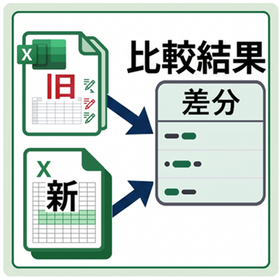
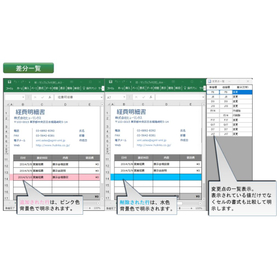
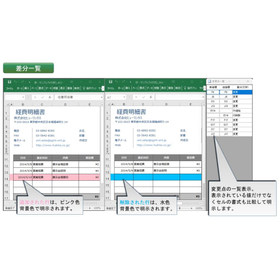
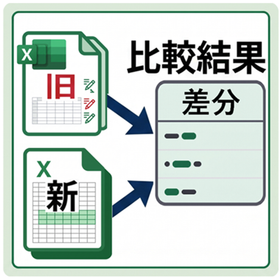
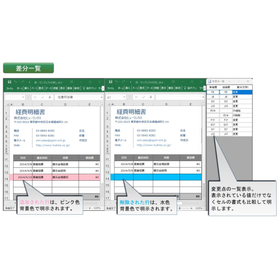
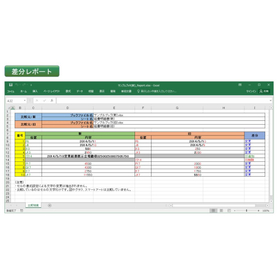
In the financial industry, it is essential to accurately manage the revision history of agreements and to fully understand any changes made. Particularly from the perspective of accountability to customers and compliance with laws and regulations, even minor changes cannot be overlooked. Tracking revisions to agreements, identifying changes, and comparing them with previous versions is a time-consuming and labor-intensive task. Our product, "Old and New Document Excel Version," operates as a Microsoft Excel plugin and visually highlights changes by comparing two documents. This streamlines the tracking of agreement revisions and enhances accuracy. 【Use Cases】 - Management of revision histories for agreements, terms and conditions, and important explanatory documents in financial institutions - Verification of changes in agreements by compliance departments - Understanding changes when creating explanatory materials for customers in sales departments - Risk assessment related to changes in agreements by legal departments 【Benefits of Implementation】 - Rapid identification and verification of changes in agreement revisions - Reduction of compliance risks by preventing omissions and errors - Shortening of business hours through the efficiency of comparison tasks - Strengthening of accountability through accurate difference reports

  • dc_5-3a-1024x591.jpg
  • dc_7-3a-1024x572.jpg
  • Catalog and manual creation
  • Document and Data Management
  • Comparison Software

Added to bookmarks

Bookmarks list

Bookmark has been removed

Bookmarks list

You can't add any more bookmarks

By registering as a member, you can increase the number of bookmarks you can save and organize them with labels.

Free membership registration

Comparison of Old and New Clinical Trial Data for the Pharmaceutical Industry: 'Old and New Document Excel Version'

Easily check changes and updates in clinical trial data at a glance in Excel.

In the pharmaceutical industry, managing clinical trial data is extremely important for maintaining the accuracy and consistency of the data. Particularly when comparing old and new data due to changes in the clinical trial protocol or updates in data entry, it is necessary to quickly identify even the slightest discrepancies. Inconsistent data can undermine the reliability of clinical trial results and may also affect submissions to regulatory authorities. Our product, "Old and New Document Excel Version," operates as a Microsoft Excel plugin, streamlining the process of comparing clinical trial data and clearly visualizing changes and omissions. 【Usage Scenarios】 - Confirming data consistency during changes to the clinical trial protocol - Checking discrepancies in data entry by multiple personnel - Checking for omissions in updates by comparing past data with the latest data - Validating data before preparing documents for regulatory submissions 【Benefits of Implementation】 - Improved accuracy of clinical trial data - Increased efficiency and time savings in data comparison tasks - Reduced risk of omissions and errors - Alleviated burden of data management tasks

  • dc_5-3a-1024x591.jpg
  • dc_7-3a-1024x572.jpg
  • Catalog and manual creation
  • Document and Data Management
  • Comparison Software

Added to bookmarks

Bookmarks list

Bookmark has been removed

Bookmarks list

You can't add any more bookmarks

By registering as a member, you can increase the number of bookmarks you can save and organize them with labels.

Free membership registration

Comparison of Curriculum Revisions for Educational Institutions: 'Old and New Documents Excel Version'

Support for the revision of educational institution curricula. Clearly understand the changes.

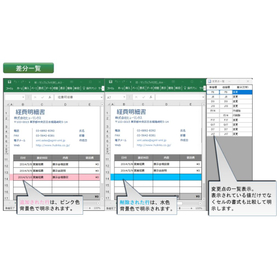
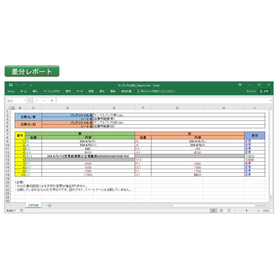
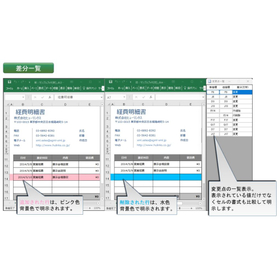
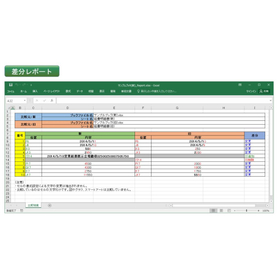
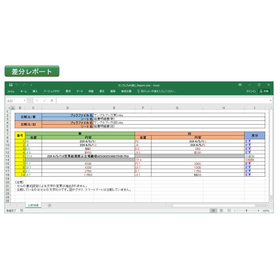
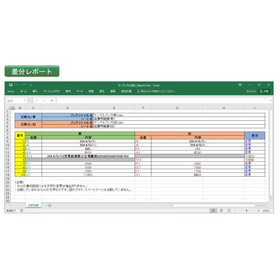
In curriculum revisions at educational institutions, it is essential to accurately compare past materials with the latest information to ensure that changes and updates are fully understood. Particularly in the review of curricula associated with revisions to learning guidelines or the introduction of new educational policies, overlooking minor changes can impact the quality of education. Our product, "New and Old Documents Excel Version," operates as a plugin for Microsoft Excel, allowing for the rapid identification of changes even in large worksheets by comparing two documents. It automatically generates accurate and easy-to-read "difference lists" and "difference reports" with simple operations, enabling users to jump to the cells with changes from the comparison display with one click, thus supporting efficient curriculum revision work. ## Use Cases * Comparing past materials with the latest materials during curriculum revisions * Confirming changes in educational content due to revisions of learning guidelines * Managing update histories of teaching materials * Comparing and discussing curriculum proposals among multiple teachers ## Benefits of Implementation * Prevention of overlooking changes in curriculum revisions * Reduction of work time and increased efficiency * Maintenance and improvement of consistency and quality in educational content * Facilitation of smooth information sharing among stakeholders

  • dc_5-3a-1024x591.jpg
  • dc_7-3a-1024x572.jpg
  • Catalog and manual creation
  • Document and Data Management
  • Comparison Software

Added to bookmarks

Bookmarks list

Bookmark has been removed

Bookmarks list

You can't add any more bookmarks

By registering as a member, you can increase the number of bookmarks you can save and organize them with labels.

Free membership registration

Comparison of the revision of the guidelines for medical use: "Old and New Documents Excel Version"

Streamline the updating and management of clinical guidelines. Accurately grasp the changes.

In the medical industry, particularly in the creation and revision of clinical guidelines, accuracy based on the latest medical knowledge and smooth information sharing among stakeholders are essential. Oversights or errors in updating guidelines can directly lead to a decline in the quality of healthcare. Therefore, a function that allows for the rapid and accurate identification of changes when comparing old and new documents is indispensable. Our product, "Old and New Document Excel Version," operates as a Microsoft Excel plugin and addresses these challenges. 【Usage Scenarios】 - Revision work for clinical guidelines - Comparison with past guidelines - Sharing of changes among multiple stakeholders - Prevention of oversights and errors 【Benefits of Implementation】 - Increased efficiency in the creation and revision of clinical guidelines - Reduction of mistakes through accurate identification of changes - Smooth information sharing among stakeholders - Rapid provision of the latest clinical guidelines

  • dc_5-3a-1024x591.jpg
  • dc_7-3a-1024x572.jpg
  • Catalog and manual creation
  • Document and Data Management
  • Comparison Software

Added to bookmarks

Bookmarks list

Bookmark has been removed

Bookmarks list

You can't add any more bookmarks

By registering as a member, you can increase the number of bookmarks you can save and organize them with labels.

Free membership registration

Comparison of Product List Updates for the Distribution Industry: 'Old and New Documents Excel Version'

Easily check updates and changes in the product list at a glance in Excel.

In the retail industry, updating product lists requires accuracy and efficiency. Particularly when handling a large amount of product information, overlooking changes or missing updates can lead to inventory management issues and lost sales opportunities. Maintaining accurate product information is essential for smooth business operations. "The Old and New Documents Excel Version" operates as a Microsoft Excel plugin, allowing users to visually grasp changes by comparing two product lists—old and new. Even with large worksheets, it enables quick identification of added, changed, or deleted items, preventing missed updates. 【Usage Scenarios】 - Updating product lists by multiple personnel - Regular maintenance of product information - List verification during price revisions or specification changes - Confirming differences from past lists 【Benefits of Implementation】 - Reduction of human errors during product list updates - Shortened work time and increased efficiency - Improved business accuracy through precise product information management - Prevention of opportunity loss due to missed updates

  • dc_5-3a-1024x591.jpg
  • dc_7-3a-1024x572.jpg
  • Catalog and manual creation
  • Document and Data Management
  • Comparison Software

Added to bookmarks

Bookmarks list

Bookmark has been removed

Bookmarks list

You can't add any more bookmarks

By registering as a member, you can increase the number of bookmarks you can save and organize them with labels.

Free membership registration

[For the Advertising Industry] Changes to Campaign Materials: "New and Old Documents Excel Version"

Easily understand the comparison results of Excel documents at a glance, and grasp differences and missed updates.

In the advertising industry, managing Excel documents that frequently require updates and have multiple versions, such as campaign materials and proposals, is crucial. Particularly in the creation of campaign proposals, comparing with past materials and sharing changes among multiple team members is essential. Miscommunication or missed updates can impact the effectiveness of a campaign. Our product, "New and Old Document Excel Version," operates as a plugin for Microsoft Excel, allowing users to compare two Excel documents and clearly display the changes. This enables quick understanding of changes even in large worksheets, improving efficiency and accuracy in campaign proposal creation. 【Usage Scenarios】 - Version management of campaign materials - Comparison with past materials in proposals - Confirmation of changes among multiple team members - Prevention of missed updates 【Benefits of Implementation】 - Speeding up the creation of campaign proposals - Smoother information sharing - Improving campaign quality by reducing errors

  • dc_5-3a-1024x591.jpg
  • dc_7-3a-1024x572.jpg
  • Catalog and manual creation
  • Document and Data Management
  • Comparison Software

Added to bookmarks

Bookmarks list

Bookmark has been removed

Bookmarks list

You can't add any more bookmarks

By registering as a member, you can increase the number of bookmarks you can save and organize them with labels.

Free membership registration

[For Consultants] Comparison of Proposal Creation with 'Old and New Document Excel Version'

List the differences and updates of the Excel proposal to streamline the comparison process.

In the consulting industry and during the preparation of proposals, it is important to check for any changes or omissions between multiple versions before submitting to the client. Particularly when detailed revisions or the incorporation of additional information is required, manual comparison can be time-consuming and carries the risk of oversight. Accurate and swift comparison work is essential to maintain the quality of proposals and gain the trust of clients. Our product, "Old and New Document Excel Version," addresses these challenges by automatically generating a comparison table that allows for a quick overview of the comparison results of Excel documents, thus supporting efficient and accurate verification work. ## Use Cases - Version management during proposal preparation by multiple team members - Checking changes after incorporating client feedback - Ensuring consistency by comparing with past proposals - Preventing omissions in document updates during project progress ## Benefits of Implementation - Reduction in time spent on proposal preparation and review - Improvement in proposal quality by preventing oversight of changes - Promotion of rapid information sharing and decision-making - Smoother communication with clients

  • dc_5-3a-1024x591.jpg
  • dc_7-3a-1024x572.jpg
  • Catalog and manual creation
  • Document and Data Management
  • Comparison Software

Added to bookmarks

Bookmarks list

Bookmark has been removed

Bookmarks list

You can't add any more bookmarks

By registering as a member, you can increase the number of bookmarks you can save and organize them with labels.

Free membership registration

Web Comparison System

This is a product that allows for easy automatic comparison of old and new drawings and documents.

The web comparison system enables high-performance drawing and document comparisons. - It allows for the comparison of PDF/TIFF drawings, automatically comparing scanned drawings or drawings with different page counts. - It is also possible to compare documents such as Excel, Word, DocuWorks, and PDF, and generate a list of discrepancies. - This is an on-premise product used as an internal system. - Since files are not sent to the cloud, security is assured. - It can be used with just a web browser on a PC, and no software installation is required. - It is also possible to use the trial version for business purposes to measure effectiveness. *For more details, please download the PDF or feel free to contact us.*

  • Other information systems
  • Comparison Software

Added to bookmarks

Bookmarks list

Bookmark has been removed

Bookmarks list

You can't add any more bookmarks

By registering as a member, you can increase the number of bookmarks you can save and organize them with labels.

Free membership registration

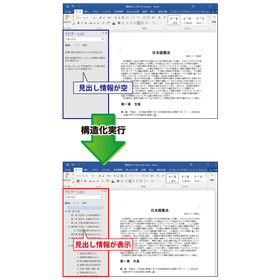
Revision work of quality standard documents for the manufacturing industry with 'Old and New Document Word Versions'

A tool for comparing old and new documents to support the revision of quality standards in the manufacturing industry.

In the manufacturing industry, revisions of quality standards are frequently conducted to maintain and improve product quality. It is particularly important to accurately understand the differences between the revised standards and the old standards, and to share this information among stakeholders to prevent misunderstandings and maintain consistent quality. If the changes in the standards are unclear, there is a risk of confusion in the manufacturing process and a decline in product quality. Our product "New and Old Document Word Version" supports the comparison of new and old Word documents, clarifying changes to facilitate accurate information transmission and smooth operations in quality standard revisions. [Usage Scenarios] - Revision of quality standard documents - Updating manufacturing manuals - Change management of inspection standards - Revision of internal regulations [Benefits of Implementation] - Rapid identification of revision points - Prevention of discrepancies in understanding among stakeholders - Accurate communication of quality standards - Increased efficiency in revision work

  • Shinkyu_01.png
  • Shinkyu_02.png
  • Shinkyu_03.png
  • 202504_oan_w_01.png
  • 202505_oan-03.png
  • 202505_oan-04.png
  • Catalog and manual creation
  • Document and Data Management
  • Comparison Software

Added to bookmarks

Bookmarks list

Bookmark has been removed

Bookmarks list

You can't add any more bookmarks

By registering as a member, you can increase the number of bookmarks you can save and organize them with labels.

Free membership registration

Change in requirements definition for IT and software: 'Old and New Document Word Version'

Generation of a comparison table for efficient management of requirement definition changes in IT and software development.

In the IT and software industry, changes in requirement definitions during the development process occur frequently, and the accurate management of change history and rapid sharing among stakeholders are key to project success. In particular, updating documents due to specification changes is prone to errors, and manual management requires a lot of time. In response to these challenges, our product "New and Old Document Word Version" visually compares changes in Word documents and automatically generates a comparison table, thereby improving the accuracy and efficiency of document management associated with requirement definition changes. 【Usage Scenarios】 - Management of change history for requirement definition documents - Updating documents due to specification changes - Sharing changes within the development team - Confirming differences in the review process 【Benefits of Implementation】 - Reduction of misunderstandings through visual understanding of changes - Increased efficiency in document updating tasks through manual work - Rapid and accurate information sharing among stakeholders - Improved project transparency and reduction of rework

  • Shinkyu_01.png
  • Shinkyu_02.png
  • Shinkyu_03.png
  • 202504_oan_w_01.png
  • 202505_oan-03.png
  • 202505_oan-04.png
  • Catalog and manual creation
  • Document and Data Management
  • Comparison Software

Added to bookmarks

Bookmarks list

Bookmark has been removed

Bookmarks list

You can't add any more bookmarks

By registering as a member, you can increase the number of bookmarks you can save and organize them with labels.

Free membership registration

[For Medical Use] Update of Clinical Guidelines with 'Old and New Document Word Version'

A tool for generating comparison tables of old and new Word documents to support the update of clinical guidelines.

In the medical industry, particularly in the updating of clinical guidelines, accurate comparisons with past records and the reflection of the latest information are required. Changes in guidelines directly affect the quality of patient care and the judgment of healthcare professionals, making it crucial to clearly understand even the slightest differences. Inadequate updates may increase the risk of medical errors. Our product, "Old and New Document Word Version," supports the comparison of old and new Word documents and generates a comparison table that lists changes, contributing to the improvement of accuracy and efficiency in the updating of clinical guidelines. 【Usage Scenarios】 - Revision of clinical guidelines - Comparison and verification of past guidelines with the latest version - Recording and sharing of changes - Comparison of PDF-formatted guidelines 【Benefits of Implementation】 - Rapid identification and verification of changes - Reduction of work time and increased efficiency - Decrease in the risk of medical errors - Facilitation of information sharing among stakeholders

  • Shinkyu_01.png
  • Shinkyu_02.png
  • Shinkyu_03.png
  • 202504_oan_w_01.png
  • 202505_oan-03.png
  • 202505_oan-04.png
  • Catalog and manual creation
  • Document and Data Management
  • Comparison Software

Added to bookmarks

Bookmarks list

Bookmark has been removed

Bookmarks list

You can't add any more bookmarks

By registering as a member, you can increase the number of bookmarks you can save and organize them with labels.

Free membership registration

Word version of the old and new documents for the renewal of the contract for real estate.

Generation of a comparison table for updating real estate contracts efficiently.

In the real estate industry, the process of updating contracts requires an accurate comparison with past contract contents and a clear understanding of changes. In particular, modifications to clauses due to legal reforms or market changes, as well as the addition or deletion of special provisions, necessitate careful verification to prevent misunderstandings and disputes. Creating a new contract that accurately reflects the contents of the old contract while incorporating the latest terms is a process that demands time and effort. The "Old and New Document Word Version" operates as a Microsoft Word plugin and addresses this challenge. By simply loading the old and new contracts, it automatically generates a visually clear "comparison table" highlighting the changes. This streamlines the verification process of contract contents and supports improved accuracy in contract renewal tasks. 【Usage Scenarios】 - Confirming changes in conditions during the renewal of lease agreements - Identifying additions or deletions of special provisions in sales contracts - Comparing amendments in important matter explanation documents and contract clauses 【Benefits of Implementation】 - Reduces the time spent on verification tasks during contract updates - Prevents oversight of changes and enhances the accuracy of contract contents - Supports rapid responses to legal reforms and changes in internal regulations

  • Shinkyu_01.png
  • Shinkyu_02.png
  • Shinkyu_03.png
  • 202504_oan_w_01.png
  • 202505_oan-03.png
  • 202505_oan-04.png
  • Catalog and manual creation
  • Document and Data Management
  • Comparison Software

Added to bookmarks

Bookmarks list

Bookmark has been removed

Bookmarks list

You can't add any more bookmarks

By registering as a member, you can increase the number of bookmarks you can save and organize them with labels.

Free membership registration

[For the construction industry] Revision history of drawings and specifications in 'Old and New Document Word Version'

A tool for generating comparison tables to streamline specification change management in the construction industry.

In the construction industry, it is essential to accurately grasp and share the revision history of drawings and specifications among stakeholders when managing changes in specifications. In particular, clarifying the differences between old and new documents associated with specification changes and making the changes easily understandable at a glance helps prevent misunderstandings and rework, leading to smooth project progress. However, manual comparison and difference verification are time-consuming and carry the risk of oversight. Our product, "Old and New Document Word Version," operates as a Microsoft Word plugin and addresses this issue. 【Usage Scenarios】 - Management of revision history for drawings and specifications - Rapid sharing of changes among stakeholders - Consistency verification through comparison with past specifications - Record-keeping for compliance purposes 【Benefits of Implementation】 - Reduction in time spent on verification tasks for specification changes - Decreased risk of overlooking changes - Prevention of discrepancies in understanding among stakeholders and reduction of rework - Improved accuracy and efficiency in document management

  • Shinkyu_01.png
  • Shinkyu_02.png
  • Shinkyu_03.png
  • 202504_oan_w_01.png
  • 202505_oan-03.png
  • 202505_oan-04.png
  • Catalog and manual creation
  • Document and Data Management
  • Comparison Software

Added to bookmarks

Bookmarks list

Bookmark has been removed

Bookmarks list

You can't add any more bookmarks

By registering as a member, you can increase the number of bookmarks you can save and organize them with labels.

Free membership registration

Updated proposal changes for consulting: 'Old and New Document Word Version'

Generation of a comparison table to streamline the update of proposal documents.

In the consulting industry and the task of updating proposals, it is essential to accurately compare past proposal content with the latest information and clearly identify changes. Particularly in proposals to clients, presenting detailed revision histories and changes in an understandable manner is crucial for building trust and reaching agreements. Inadequate comparisons or unclear presentations of changes can lead to misunderstandings, project delays, and decreased client satisfaction. The "Old and New Document Word Version" generates a clear comparison table of the results from comparing Word documents, supporting the proposal update process. 【Usage Scenarios】 - Comparing past proposals with the latest version - Confirming changes when reflecting client feedback - Document reviews among multiple team members 【Benefits of Implementation】 - Rapid understanding of changes - Prevention of missed corrections and errors - Reduction in proposal preparation time

  • Shinkyu_01.png
  • Shinkyu_02.png
  • Shinkyu_03.png
  • 202504_oan_w_01.png
  • 202505_oan-03.png
  • 202505_oan-04.png
  • Catalog and manual creation
  • Document and Data Management
  • Comparison Software

Added to bookmarks

Bookmarks list

Bookmark has been removed

Bookmarks list

You can't add any more bookmarks

By registering as a member, you can increase the number of bookmarks you can save and organize them with labels.

Free membership registration

[For the IT Industry] Code Review Change Management with 'Old and New Document Excel Version'

Easily understand the comparison results of Excel documents at a glance, grasping differences and missed updates.

In the IT industry, code reviews are crucial for accurately understanding changes and detecting unintended modifications. Particularly in collaborative work among multiple developers and managing legacy code assets, overlooking changes can become a breeding ground for bugs. Accurate difference management is essential for maintaining code quality and improving development efficiency. Our product, "New and Old Documents Excel Version," visually displays changes in Excel format files in an easily understandable way and automatically generates precise difference reports, helping to address these challenges. 【Usage Scenarios】 - Confirming changes when sharing Excel files among multiple people - Checking differences from previous versions - Verifying missed updates - Identifying the scope of impact due to specification changes 【Benefits of Implementation】 - Rapid identification and understanding of changes - Improved accuracy in code reviews - Reduction of manual comparison tasks - Prevention of issues caused by missed updates

  • dc_5-3a-1024x591.jpg
  • dc_7-3a-1024x572.jpg
  • Catalog and manual creation
  • Document and Data Management
  • Comparison Software

Added to bookmarks

Bookmarks list

Bookmark has been removed

Bookmarks list

You can't add any more bookmarks

By registering as a member, you can increase the number of bookmarks you can save and organize them with labels.

Free membership registration

Excel Version of 'Old and New Documents' for Managing Contract Amendments in the Legal Industry

Easily check the differences in contract amendments and any missed updates in Excel at a glance.

In the legal industry, accurate modification and management of contracts are essential for avoiding legal risks. Particularly when contracts are frequently updated among multiple stakeholders, overlooking changes or missing updates can lead to future troubles. Accurate and efficient difference management is required. The "Old and New Document Excel Version" operates as a Microsoft Excel plugin, comparing two contracts (Excel files) and clearly displaying the changes. Even in large worksheets, changes can be quickly identified, and accurate and easy-to-read "difference lists" and "difference reports" are automatically generated with simple operations. With one click, users can jump to the cells with changes from the comparison display, contributing to the efficiency of the modification process. [Usage Scenarios] - Version management of contracts - Contract reviews among multiple stakeholders - Comparison checks with past contracts [Benefits of Implementation] - Prevention of overlooking changes - Increased efficiency in modification work - Improved accuracy in contract management

  • dc_5-3a-1024x591.jpg
  • dc_7-3a-1024x572.jpg
  • Catalog and manual creation
  • Document and Data Management
  • Comparison Software

Added to bookmarks

Bookmarks list

Bookmark has been removed

Bookmarks list

You can't add any more bookmarks

By registering as a member, you can increase the number of bookmarks you can save and organize them with labels.

Free membership registration

Property Information Change Management for Real Estate: 'Old and New Document Excel Version'

Excel comparison tool to prevent omissions in updating property information and clarify differences.

In the real estate industry, the accuracy of property information and prompt updates are directly linked to customer satisfaction and operational efficiency. Particularly when there are many changes to property information or when sharing information among multiple representatives, the likelihood of missing updates or making errors increases, which can lead to providing incorrect information to customers or losing opportunities. Our product, "New and Old Document Excel Version," operates as a Microsoft Excel plugin and visually identifies changes by comparing two Excel files of property information, helping to prevent missed updates. 【Usage Scenarios】 - Regular updates of property information - Sharing property information among multiple representatives - Comparing and verifying with past property information 【Benefits of Implementation】 - Reduction of missed updates and errors in property information - Shortening the time required for difference verification - Improvement in operational efficiency

  • dc_5-3a-1024x591.jpg
  • dc_7-3a-1024x572.jpg
  • Catalog and manual creation
  • Document and Data Management
  • Comparison Software

Added to bookmarks

Bookmarks list

Bookmark has been removed

Bookmarks list

You can't add any more bookmarks

By registering as a member, you can increase the number of bookmarks you can save and organize them with labels.

Free membership registration

Search Keywords Related to Comparison Software